


Teks penuh artikel ini dalam bahasa Inggeris.
A customer who has to open a browser, search for your business, and repeat the same steps on every visit may not return. A well-planned mobile app can reduce that friction, but choosing an android app builder for business is not simply a design decision. It affects how you manage customer data, publish updates, connect your website, control costs, and support the app after launch.
For many small businesses, the right builder is the one that solves a focused problem without creating another system to maintain. The wrong one can leave you paying for features nobody uses, relying on limits you did not see during the trial, or rebuilding the app when your needs change.
Start With the Business Problem, Not the App Template
An Android app should give customers, staff, or partners a faster way to complete a recurring task. That might mean ordering products, booking appointments, viewing service updates, accessing training materials, managing loyalty rewards, or receiving account notifications.
Be specific before comparing platforms. “We need an app” is not a requirement. “Customers should be able to book, pay, and receive appointment reminders from their phones” is a workable starting point. It gives you a way to evaluate whether a builder supports your actual workflow.
A simple customer-facing app may need product listings, a contact form, push notifications, and links to a booking system. An internal operations app may need user roles, approval steps, form submissions, photo uploads, and access to cloud data. These are different projects, even if both begin with a template.
The best first release is usually narrow. Launching with one useful function and improving it based on real behavior is often more practical than trying to reproduce your entire website inside an app.
What an Android App Builder for Business Should Handle
Most app builders promise fast publishing and prebuilt design components. Those are useful, but the operational details matter more once the app has customers.
Brand control and user experience
Your app should reflect your business without requiring a designer for every small change. Look for control over colors, navigation, icons, screen layouts, and branded content. At the same time, avoid over-customizing standard Android patterns. Customers expect familiar navigation, readable buttons, and predictable forms.
Templates can save considerable time for restaurants, service providers, online stores, fitness businesses, and event organizers. They become less useful when your process depends on unusual calculations, complex permissions, or proprietary workflows.
Integrations that reduce duplicate work
A builder is only as useful as the systems it can connect to. Confirm whether it integrates with your payment provider, scheduling platform, ecommerce store, customer database, email marketing tool, and customer support process.
If the builder cannot connect directly, ask whether it supports APIs, webhooks, or a middleware service. An integration that only displays data is different from one that can create orders, update bookings, or write customer details back to your main system.
Avoid entering the same customer information into separate dashboards. Duplicate work creates errors and makes reporting harder. Your app should support the systems your business already depends on, not become an isolated channel.
User accounts, roles, and data access
If customers create accounts, determine where those accounts are stored and how passwords are managed. If employees use the app, check whether you can limit access by role. A field technician may need job details and upload permissions, while a manager may need reporting and approval controls.
Do not treat access control as an enterprise-only concern. Even a small business should know who can view customer records, export information, change content, and manage billing for the app platform.
Compare Builder Types Before You Commit
There is no single best platform for every business. The practical choice depends on how much customization you need, who will maintain the app, and whether the app is expected to become a core product.
| Builder type | Best fit | Main trade-off | |---|---|---| | Template-based no-code builder | Simple catalogs, bookings, loyalty programs, and content apps | Limited custom workflows and design flexibility | | Visual low-code builder | Businesses that need forms, logic, databases, and integrations | Requires more setup and a clearer technical owner | | Website-to-app builder | Businesses with mobile-friendly web content and straightforward customer actions | Can feel like a wrapped website if not configured carefully | | Custom development platform | Complex products, unique processes, or high-volume operations | Higher cost, longer delivery time, and ongoing development responsibility |
A no-code option can be a sensible place to start when speed and affordability matter most. A low-code system may be better when the app needs to interact with multiple services or follow internal rules. Custom development is justified when the app itself is a major part of your business model, not just an additional customer channel.
Check Publishing, Ownership, and Ongoing Costs
Publishing to Google Play is a business process, not a one-time button click. Ask whether the builder helps prepare store listings, privacy disclosures, screenshots, version updates, and policy changes. Confirm who owns the Google Play developer account. It should normally be your business, not a contractor or a platform account you cannot control.
Also ask what happens if you cancel. Can you export your content, customer data, media files, and app configuration? Can you move the app to another provider, or does the platform control the source code and distribution process? Builder lock-in is not always a reason to reject a service, but it should be understood before launch.
The monthly subscription is only part of the budget. Your total cost can include Google Play registration, premium integrations, payment processing, content updates, notification usage, support, design work, and maintenance. If staff members will manage the app, include their training time as well.
Pricing should be easy to explain internally. A lower entry plan may be appropriate for a pilot, but verify whether it includes custom domains, user limits, analytics, integrations, and publishing support. The plan that looks cheapest can become expensive once essential features are added.
Connect the App to Your Wider Online Operations
An app should support your website and digital services, not compete with them. Your website remains important for search visibility, detailed service information, public content, and customers who do not want to install an app. The app can then serve repeat users with quicker access, saved preferences, notifications, and account-specific actions.
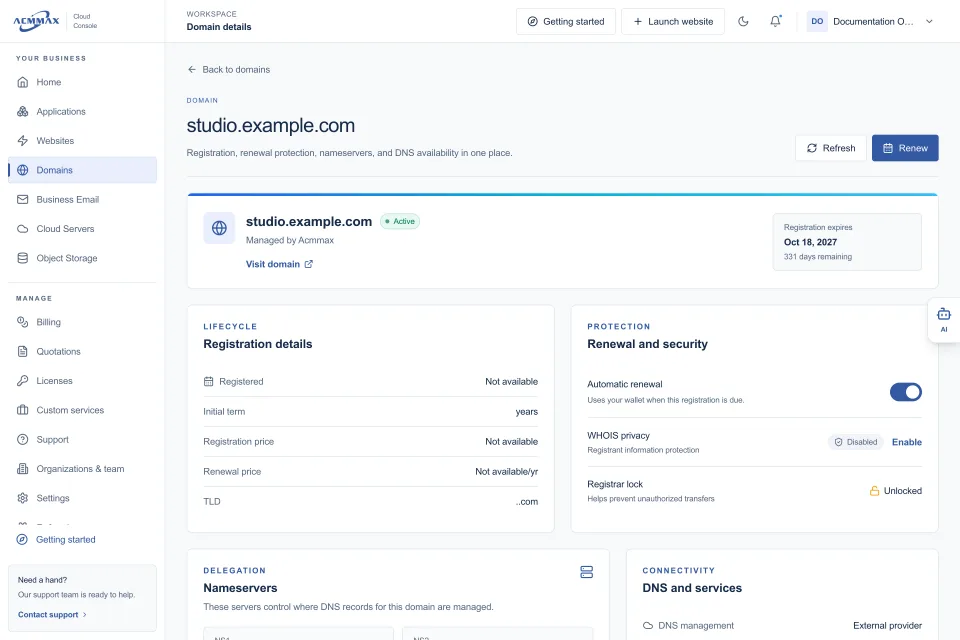
This is where organized operations matter. Your domain, website hosting, business email, storage, and customer-facing app all need clear ownership and renewal responsibility. A missed domain renewal or an outdated mailbox can affect app support just as much as it affects your website.
Businesses using a central service console such as ACMMAX can keep website services, domains, email, billing, and support administration easier to track while selecting an app builder that fits their mobile needs. The app builder does not need to provide every infrastructure service. It needs to work reliably alongside the services you already manage.
If your app uses product images, documents, video, or customer uploads, consider where those files will live and who can access them. For growing workloads, object storage and controlled access credentials may be more manageable than placing every file inside the app platform.
Test the Workflow Before You Build the Full App
A short pilot reveals more than a feature checklist. Build the most important customer journey first: make a booking, place an order, submit a request, or complete an internal inspection. Have real staff or customers try it on different Android devices.
Watch for the practical issues. Is the sign-up process too long? Are notifications useful or intrusive? Does the app load well on a mobile connection? Can staff update content without contacting a developer? Is there a clear process when a customer cannot log in?
Measure outcomes that matter to the business. For a service company, that may be completed bookings and fewer phone calls. For an ecommerce business, it may be repeat orders and abandoned cart recovery. For an internal app, it may be fewer manual handoffs and faster reporting.
Know When a Builder Is Not Enough
An app builder may not be the right answer if your requirements include advanced offline operation, real-time location tracking, complex inventory synchronization, specialized hardware access, extensive custom logic, or strict compliance controls. It may also be a poor fit if the business lacks someone who can own content, user support, and regular updates.
That does not mean you need a large custom development project immediately. You may be able to keep the first version focused, use a builder for customer-facing features, and move selected functions to custom development as demand becomes clear.
Choose a platform based on the work your customers and staff need to complete next month, while checking that it will not block the business six months from now. A useful Android app is not the one with the most features. It is the one your team can maintain confidently and your customers choose to use again.