



Teks penuh artikel ini dalam bahasa Inggeris.
A website rarely fails because someone forgot how to publish a page. It fails because a domain renewal was missed, a backup could not be restored, a mailbox stopped receiving messages, or nobody knew who had access to the hosting account. This website operations management guide is for businesses that need to manage those routine responsibilities without turning every small task into a technical project.
For a small business, agency, or freelance team, website operations is the work that keeps your online presence available, secure, current, and paid for. It includes the website itself, but also the hosting, domain, DNS records, email, backups, user access, billing, and support processes around it.
What Website Operations Management Covers
Website operations management is not a single setting or service plan. It is a working system for knowing what you own, who manages it, when it renews, and how to respond when something changes.
A typical business website may depend on several connected services. WordPress needs hosting and updates. A domain needs registration and DNS management. Business email needs mailbox administration and correct DNS records. Forms, media libraries, application files, and backups may require storage. Each dependency creates a point where a small oversight can become a customer-facing problem.
The objective is not to give every team member administrator access or to perform technical work manually. The objective is clear control. Your team should be able to answer simple questions quickly: Where is the site hosted? Who can update it? When does the domain renew? Are backups working? Which invoice needs approval?
Start With an Operations Inventory
Before changing providers or installing new tools, document the services already attached to your website. This first pass often exposes duplicate accounts, expired credentials, old DNS records, and services that only one former employee understands.
Record the provider, account owner, renewal date, billing method, technical owner, and support contact for each service. For agencies, repeat this process for every client. A shared spreadsheet can work at the start, but it should not become the only source of truth if your team has multiple people managing client services.
Your inventory should cover at least these areas:
- Website platform, hosting plan, server details, and administrator accounts
- Domain registrations, DNS zones, SSL certificates, and renewal settings
- Business email providers, mailboxes, aliases, and DNS authentication records
- Backup locations, retention periods, restore procedures, and storage access
- Billing contacts, payment methods, invoices, subscriptions, and renewal dates
This information is operational, not administrative clutter. When a site goes offline or a team member leaves, accurate ownership records shorten the time between identifying a problem and fixing it.
Put Routine Work in One Operating Rhythm
The best operations process is one your team will actually follow. Avoid building a complicated maintenance calendar that requires hours every day. Instead, assign checks based on how often risks can reasonably change.
| Frequency | What to review | Why it matters | | --- | --- | --- | | Weekly | Website availability, form submissions, updates, backup status | Catches visible issues before they become long-running problems | | Monthly | User access, security notices, storage use, invoices | Keeps accounts controlled and costs visible | | Quarterly | DNS records, recovery contacts, plugin or application needs | Removes outdated configuration and reduces exposure | | Before renewal | Service usage, plan fit, payment method, ownership | Prevents unwanted expiration or paying for unused capacity |
A brochure site with limited changes may only need a brief weekly check. An ecommerce site, agency portfolio, or lead-generation site with paid traffic should be reviewed more closely. The right schedule depends on revenue impact, update frequency, and how quickly an outage affects customers.
Assign a named owner for each check. “The team” is not an owner. One person can be responsible for reviewing the status, even when another person handles technical changes. For client work, make clear where agency responsibility ends and client approval begins, especially for renewals, content updates, and billing.
Manage Backups as a Recovery Plan
A backup is only useful if it can be restored. Many teams see a successful backup notification and assume recovery is covered, but they have never confirmed what is included or how long restoration takes.
For WordPress, confirm that backups include both site files and the database. A copy of files without the database may not restore posts, settings, orders, or form data. Check backup frequency against how much data your business can afford to lose. A site updated daily needs a different schedule than a site updated once per quarter.
Keep retention practical. More backup copies can provide flexibility, but storage has a cost and old backups may contain outdated plugins, credentials, or personal data. Define a retention period that fits your recovery needs and compliance obligations.
Most importantly, test a restore in a safe environment at least periodically. You do not need to make this a weekly exercise, but a documented restore test reveals whether access is available, instructions are current, and the backup actually contains a usable version of the site.
Treat Domains, DNS, and Email as Business-Critical Services
Your domain is more than a website address. It often controls website traffic, email delivery, verification records, and third-party connections. Losing access to the domain account can interrupt several services at once.
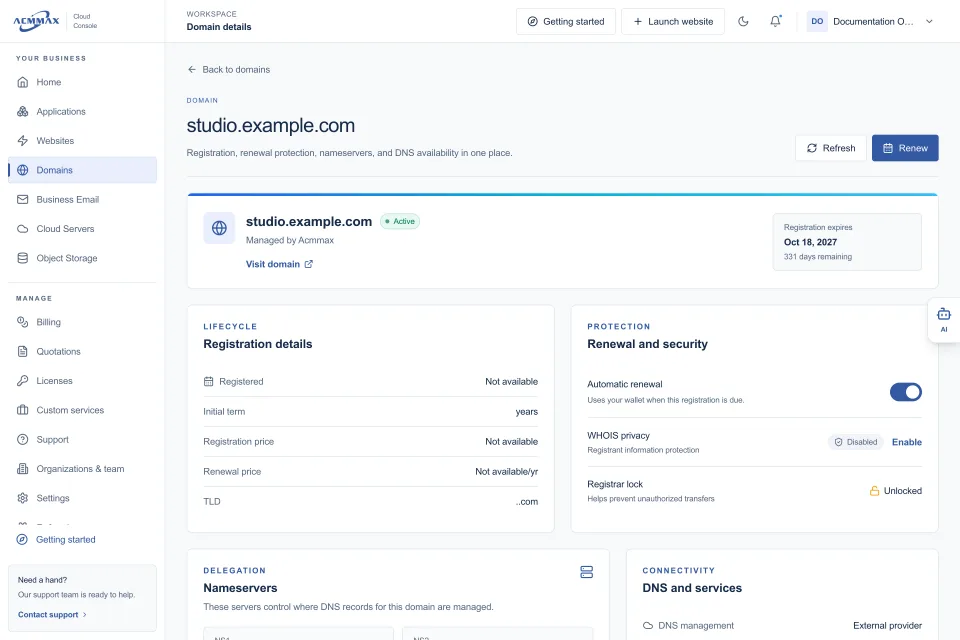
Use a business-owned account and a monitored business email address for domain registration. Do not rely solely on an employee’s personal address or a developer’s account. Enable auto-renewal where appropriate, maintain a valid payment method, and keep recovery details current.
DNS changes deserve a simple approval process. A new email service, website migration, or marketing platform may require records such as A, CNAME, MX, TXT, SPF, DKIM, or DMARC. These records are not interchangeable. An incorrect MX record can stop email delivery; an incorrect A record can send visitors to the wrong server.
Before making changes, export or document the current DNS zone. Make one planned change at a time when possible, then verify the website, email, and key forms after propagation. If a provider gives you a block of DNS records to add, review it carefully rather than replacing unrelated records wholesale.
Control Access Without Slowing Down the Team
Shared passwords are easy at first and difficult later. They make it hard to know who changed a setting, revoke access when a contractor leaves, or protect a business when a device is lost.
Use individual user accounts whenever the service supports them. Give people the least access needed for their role. A content editor does not need billing permissions, and a bookkeeper does not need server-level access. For higher-risk accounts, require multi-factor authentication and keep recovery codes in a protected company-controlled location.
Access controls should also match your service model. Managed WordPress hosting can reduce the amount of server work a business handles directly, while cloud servers may be better for teams that need root access, custom stacks, or specialized workloads. More control can be valuable, but it also creates more responsibility for patching, monitoring, and configuration.
Make Costs and Renewals Visible Before They Become Urgent
Website operations costs are often scattered across hosting, domains, email, storage, premium plugins, support subscriptions, and development work. A low hosting price does not show the full operating cost if the business also pays separate providers for every adjacent service.
Review renewals before the due date, not after an invoice has failed. Compare actual use against the current plan: storage consumed, mailbox count, website traffic patterns, server capacity, and the number of managed sites. Upgrading too early wastes budget; waiting too long can affect performance or create rushed migration work.
A central console can reduce this friction by bringing websites, domains, email, storage, billing, and organization access into the same place. ACMMAX is designed around that practical need, giving businesses a clearer way to manage everyday services while retaining technical options for cloud servers and object storage.
Build a Simple Incident Process
When something breaks, teams lose time when everyone starts changing settings at once. Create a short response process before you need it. First, confirm the scope: is the website unavailable for everyone, is email affected, or is the issue limited to one user? Next, check recent changes, service notices, domain status, billing status, and backup availability.
Keep an incident record with the time the issue began, what changed, who was contacted, and how it was resolved. This does not need to be formal for every minor issue. It becomes useful when a problem repeats or when a client needs a clear explanation.
Good website operations should make routine work feel uneventful. That is the point. When ownership is clear, renewals are visible, backups are tested, and services are managed from an organized workspace, your team can spend less time chasing access and more time improving the website customers actually use.