




以下为英文原文。
A domain renewal is easy to ignore when your website, email, and DNS are working. That is exactly why it creates costly problems when it is missed. This domain renewal guide explains how to keep control of the name your customers use to find your business, send email, and access online services.
For a small business, an expired domain can do more than take down a website. It can interrupt email delivery, disconnect forms, affect customer trust, and create a recovery task at the worst possible time. The goal is not simply to pay an invoice before a deadline. It is to build a clear renewal process with the right ownership, payment, DNS, and access controls behind it.
What Domain Renewal Actually Covers
A domain is registered for a fixed term, commonly one year but sometimes multiple years. Renewing it extends your right to use that domain name. The renewal affects the registration itself, not necessarily every service connected to it.
Your website hosting, business email, SSL certificate, DNS zone, and cloud applications may each have their own billing dates and renewal settings. A domain can be active while its hosting plan has expired, and a paid hosting plan cannot keep a domain active if the registration lapses. Treat these as connected services with separate responsibilities.
The practical question is: who owns each service, where is it billed, and who receives the alerts? When those answers are scattered across old employee accounts, agency logins, and different providers, a routine renewal becomes risky.
Domain Renewal Guide: Check These Details First
Before the renewal date arrives, review the domain record and account setup. This takes a few minutes and can prevent a much longer outage.
Confirm the registrant and account owner
The registrant is the legal or organizational contact associated with the domain. Make sure the registration is held by your business, not by a former employee, contractor, or web agency without documented transfer terms.
The account owner should also be a current business-controlled email address. Shared access can be useful for a team, but one person should not be the only person able to recover the account. For agencies managing client domains, establish this ownership point at onboarding rather than during an emergency.
Verify contact and notification details
Renewal reminders usually go to the account email or registrant contact. Check that these addresses are active, monitored, and not tied to the domain that may expire. If the domain is yourbusiness.com, using admin@yourbusiness.com as the only recovery contact creates a problem if email service goes offline.
Use a separate, accessible contact address for account recovery and billing notices. Also confirm the phone number and organization details are current, especially if your business has changed names, locations, or personnel.
Review payment methods and invoices
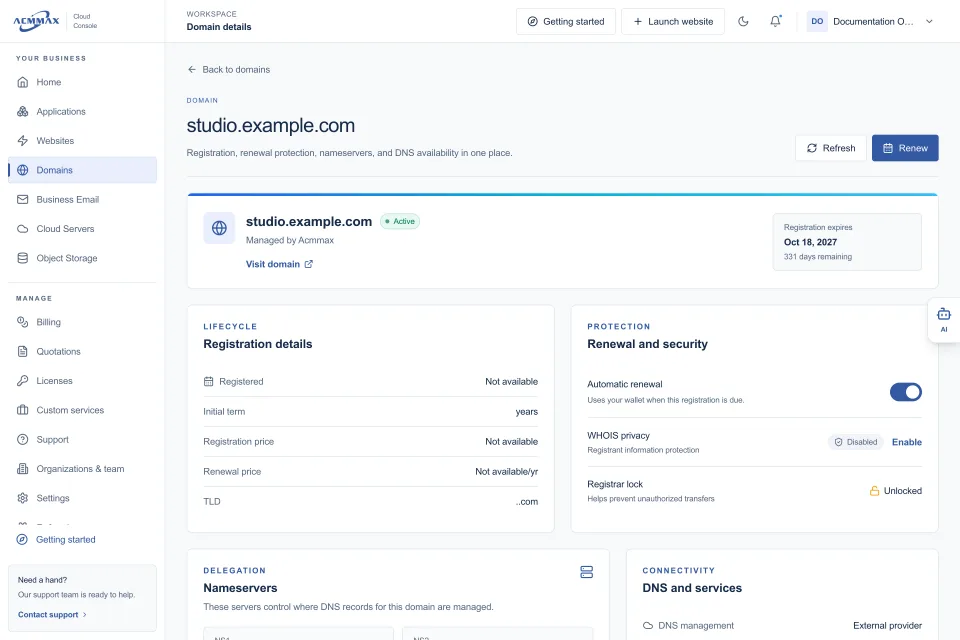
Expired cards and outdated billing contacts are common causes of accidental domain expiration. Confirm that the payment method is valid, that your billing wallet or account balance is sufficient if applicable, and that the person responsible for approving charges can access invoices.
Auto-renewal reduces risk, but it is not a substitute for payment controls. An auto-renew attempt can still fail because of a declined card, an account limit, or a billing profile that needs verification. Set a calendar reminder 30 to 60 days ahead of the expiration date, even when auto-renew is enabled.
Check domain lock and transfer status
A registrar lock helps prevent unauthorized domain transfers. For most active business domains, keeping the lock enabled is a sensible default. If you plan to transfer the domain to another registrar, you may need to unlock it and obtain an authorization code.
Avoid making a transfer decision in the final days before expiration. Transfers can require confirmation steps and may be delayed by account verification, recent registration changes, or transfer policies. Renew first if timing is tight, then complete the move under calmer conditions.
Know the Expiration Timeline
The exact timeline depends on the domain extension and registrar, but an expired domain does not always disappear immediately. That temporary window can be misleading.
On the expiration date, your domain may continue resolving for a short period, or related services may begin to fail. During a grace period, renewal is usually still possible at the standard renewal price. After that, some domains enter a redemption period, where recovery may be possible but can involve additional fees and manual processing.
If no action is taken, the domain may eventually be deleted and become available for others to register. At that stage, your business has no guaranteed right to reclaim it. A competitor, domain investor, or unrelated buyer may register it within minutes of release.
Do not rely on the grace period as part of your operating process. It is a recovery option, not an extension you should plan around. Renew before expiration, particularly for your primary business domain and domains used for email.
Protect DNS Before and After Renewal
Domain renewal should not normally change your DNS records. Still, DNS deserves attention because it controls where your domain sends web visitors, email, and service traffic.
Record your current nameservers and critical DNS entries before changing registrars, providers, or account settings. For most businesses, that means the website records, email MX records, SPF and DKIM records, verification records, and any subdomains used for portals or applications.
If you renew and keep the same registrar and DNS provider, no DNS changes are usually required. If you transfer the domain or switch DNS management, plan the change carefully. Incorrect DNS settings can cause a website to display an error, stop inbound email, or break third-party tools even though the domain itself is paid and active.
A centralized console helps reduce this risk by keeping domains, DNS, hosting, billing, and support activity visible in one place. For example, ACMMAX customers can manage domain settings alongside their website and business services rather than tracking separate dashboards for routine work.
Choose a Renewal Term That Fits Your Business
A one-year renewal provides flexibility and keeps the immediate cost lower. It works well for side projects, new brands, or domains that may not remain part of a long-term plan.
A multi-year renewal can reduce administrative work for established business domains. It also creates more time to resolve a payment or contact issue before the registration reaches its end date. The trade-off is paying more upfront and potentially making future registrar changes slightly less convenient.
For a primary company domain, the decision is usually about operational risk rather than saving a small amount on annual billing. For campaign domains, product experiments, or defensive registrations, shorter terms may be more appropriate. Assign each domain a purpose so your renewal choices are intentional.
Build a Simple Renewal Process for Your Team
Businesses with more than one domain need a repeatable process, not a collection of reminders in individual inboxes. Keep an internal domain inventory with the domain name, registrar, expiration date, renewal term, account owner, billing owner, and the services it supports.
For a lean team, review this inventory quarterly. For an agency or business with many client domains, review it monthly and assign an accountable owner. Include domains that redirect to your main site, domains held for brand protection, and domains used only for email or specialized applications.
Your process should also cover staff changes. When an employee or contractor leaves, remove unnecessary access, update the account owner where needed, and make sure recovery codes and multi-factor authentication are controlled by the business. Domain access is a high-value credential, not an afterthought.
Common Renewal Mistakes to Avoid
The first mistake is assuming a web developer or hosting provider automatically renews the domain. Unless this is explicitly included in your service agreement and visible in your account, confirm it yourself.
The second is treating the domain and website as the same product. They are related, but they can fail independently. The third is responding to every renewal email without checking the sender. Domain-related scam notices often pressure businesses to pay for unnecessary services or move a domain through misleading offers.
Finally, do not wait for a problem before documenting DNS settings and account access. The best time to verify ownership and renewal details is when every service is working normally.
A domain renewal is a small scheduled task with a large operational footprint. Put it on a clear schedule, give ownership to the right person, and keep your billing and DNS records current. Your customers should never notice that renewal happened - and that is the outcome your process should deliver.