


A compromised WordPress site can now affect more than a homepage. It can disrupt lead forms, customer trust, business email reputation, online payments, and a team’s ability to publish. WordPress security trends 2026 point to a clear shift: attackers are targeting the operational gaps around websites, not only the WordPress core itself.
For small businesses, agencies, and freelancers, the practical response is not adding every security tool available. It is building a manageable system for updates, access, backups, hosting, domains, and incident response. The sites that stay safer in 2026 will usually be the ones with clear ownership and fewer unmanaged moving parts.
WordPress Security Trends 2026 Businesses Should Watch
AI makes common attacks faster and more convincing
Automated attacks against WordPress are not new. Bots have long scanned for vulnerable plugins, weak passwords, exposed login pages, and outdated installations. What is changing is the speed and quality of the surrounding social engineering.
Attackers can use AI to produce more convincing password-reset messages, fake support tickets, plugin renewal notices, and messages that appear to come from an agency or hosting provider. A busy site manager may not notice a subtle change in a sender address, invoice detail, or login URL.
The security lesson is simple: technical controls and team habits now need to work together. Use multi-factor authentication for hosting, WordPress administrator accounts, domain registrars, and email. Confirm sensitive requests through a second channel, especially requests to change DNS records, payment details, account ownership, or administrator access.
For teams managing client sites, shared credentials should be retired. Each person needs an individual account with the access required for their role. This creates accountability and makes offboarding much safer when a contractor or employee leaves.
Plugin supply-chain risk is becoming a business issue
Plugins remain one of WordPress’s biggest advantages, but they are also a frequent source of exposure. A vulnerable plugin can be exploited directly. So can an abandoned extension, a poorly maintained premium plugin, or an update from a compromised vendor account.
In 2026, the question is not simply whether a plugin has good reviews. Businesses should ask who maintains it, how often it is updated, whether it is necessary, and what access it has to site data. A form plugin, ecommerce extension, page builder, analytics tool, and backup tool can all introduce different levels of risk.
Avoid installing plugins to solve one-time tasks. Remove inactive plugins and themes rather than leaving them installed. Before major updates, test changes on a staging environment when one is available. This adds a little process, but it is often far less costly than troubleshooting a broken checkout page or cleaning malware from a production website.
Agencies should also document approved plugins for client sites. A short approved list reduces repeated evaluation work and helps ensure that new builds follow the same supportable standard.
Login protection is moving beyond passwords
Strong passwords still matter, but passwords alone are no longer enough for administrator access. Credential-stuffing attacks use passwords leaked from unrelated services, while phishing attempts aim to collect credentials directly.
Multi-factor authentication is becoming a baseline control, particularly for administrator, editor, and ecommerce accounts. Passkeys may also become more common as platforms and browsers support passwordless sign-in more broadly. They can reduce phishing risk because authentication is tied to the legitimate site or service rather than a password typed into a convincing fake page.
Not every WordPress workflow will support passkeys immediately, and some small teams may need a phased approach. Start with the accounts that can cause the most damage: hosting control panels, domain management, email, WordPress administrators, and payment services.
It also helps to limit login attempts, disable unused accounts, and review administrator roles regularly. A former developer account with full access is a security issue even if its password is strong.
Backups are being judged by recovery speed
A backup that has never been tested is only a hopeful assumption. Ransomware, destructive plugin vulnerabilities, accidental deletions, and failed updates have made recovery readiness a larger part of WordPress security planning.
The 2026 standard is not merely keeping backups. It is knowing how quickly the site can be restored, where copies are stored, and whether a recent backup actually works. Businesses should maintain offsite copies that are separate from the main website environment. If an attacker reaches the hosting account, backups stored only in that same account may also be at risk.
Recovery needs differ by site type. A simple brochure site may accept a daily backup and a few hours of downtime. An online store with frequent orders needs more frequent backups and a process to reconcile orders placed near the time of an incident. Membership sites and booking platforms may need similar attention because customer records change throughout the day.
A practical recovery test should restore a copy to a safe environment, verify that pages and forms work, and confirm that the team can access the files and database when needed. Document the process while it is fresh. During an incident, clear steps are more useful than a collection of tools.
Hosting-level controls matter more than WordPress settings alone
WordPress security does not begin and end in the WordPress dashboard. Server configuration, file permissions, web application firewalls, malware scanning, PHP versions, SSL certificates, database access, and account isolation all influence the risk profile of a site.
Managed WordPress hosting can reduce routine maintenance work by handling parts of the underlying environment, but customers should still understand where responsibility begins and ends. For example, a hosting provider may maintain server software while the site owner remains responsible for plugin choices, user access, and content-level security.
This distinction matters when comparing hosting options. The lowest monthly price may be suitable for a small test site, while a revenue-generating site may need managed updates, daily backups, security monitoring, staging tools, and support that can help during an incident. Security is not one feature. It is the combined reliability of the environment and the people operating it.
APIs, forms, and connected services expand the attack surface
Modern WordPress sites often connect to payment processors, CRM platforms, booking systems, email marketing tools, analytics services, and cloud storage. These connections can improve operations, but every API key, webhook, and third-party integration needs management.
A common problem is credentials stored in old plugins, copied into theme files, or left active after a service is no longer used. In 2026, businesses should treat API credentials like passwords: give them only the permissions required, rotate them when a team member leaves or a service changes, and remove unused keys.
Forms deserve particular attention. They are frequent targets for spam, malicious uploads, and attempts to exploit poorly configured integrations. Use file upload restrictions when uploads are necessary, limit data collection to what the business actually needs, and make sure form notifications go to monitored business email accounts rather than a former employee’s inbox.
A Practical 2026 WordPress Security Plan
Security work becomes manageable when it is assigned to a regular operating routine. For most small businesses, the following priorities offer a strong starting point:
- Turn on multi-factor authentication for WordPress administrators, hosting, domains, and business email.
- Review every plugin and theme. Update what is supported, remove what is unused, and replace abandoned tools.
- Confirm backup frequency, keep a separate copy, and test a restoration at least once or twice a year.
- Use individual accounts and minimum permissions for employees, agencies, developers, and contractors.
- Keep WordPress core, PHP, plugins, and themes on supported versions, using a staging site for higher-risk changes.
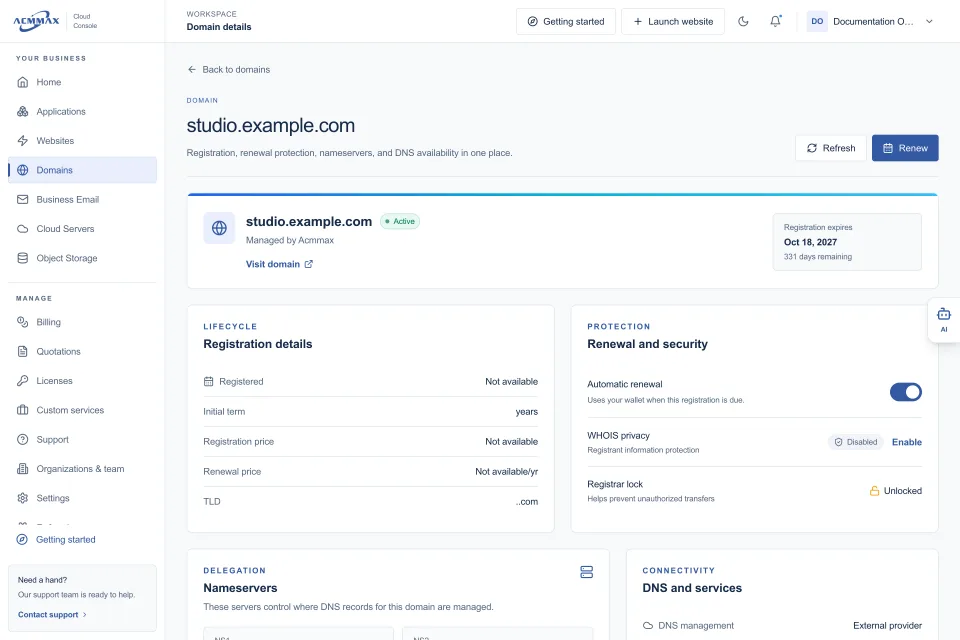
- Record who manages the domain, DNS, hosting, email, billing, and renewals so a critical task never depends on one person’s memory.
The last point is often overlooked. A site can be technically secure and still suffer downtime because the domain expires, DNS access is unavailable, or renewal notices go to an unmonitored inbox. Centralized operations make these responsibilities easier to see and assign. A platform such as ACMMAX can help teams manage WordPress, domains, backups, storage, billing, and access from one Cloud Console, reducing the number of disconnected places that require attention.
Security Is an Operating Habit, Not a One-Time Setup
The right security plan depends on your site’s purpose, revenue exposure, team size, and technical resources. A freelancer managing three informational sites will not need the same controls as an agency responsible for dozens of ecommerce stores. Both, however, need a clear answer to the same questions: who has access, what is updated, where is the backup, and what happens if something fails.
Set a recurring monthly review for updates, user accounts, backups, renewals, and security alerts. That small operational habit is one of the most practical ways to keep WordPress security aligned with how your business actually runs.